
How to Write Professional, Casual, or Playful Captions
Compare the Professional, Casual, and Playful options in Social posts. Select Use this on the one that fits the account, then adjust the first line and preview how it reads.
Compare the three caption styles
Generate the options
Open Social posts on the video and provide any instructions the copy should follow.
Read the three openings side by side
Read each opening line aloud. Check which sounds like the intended brand and which sets up the clip most clearly.
Save the selected wording
Choose Use this on the version you want. Adjust it in Selected description, then save and copy the final wording.
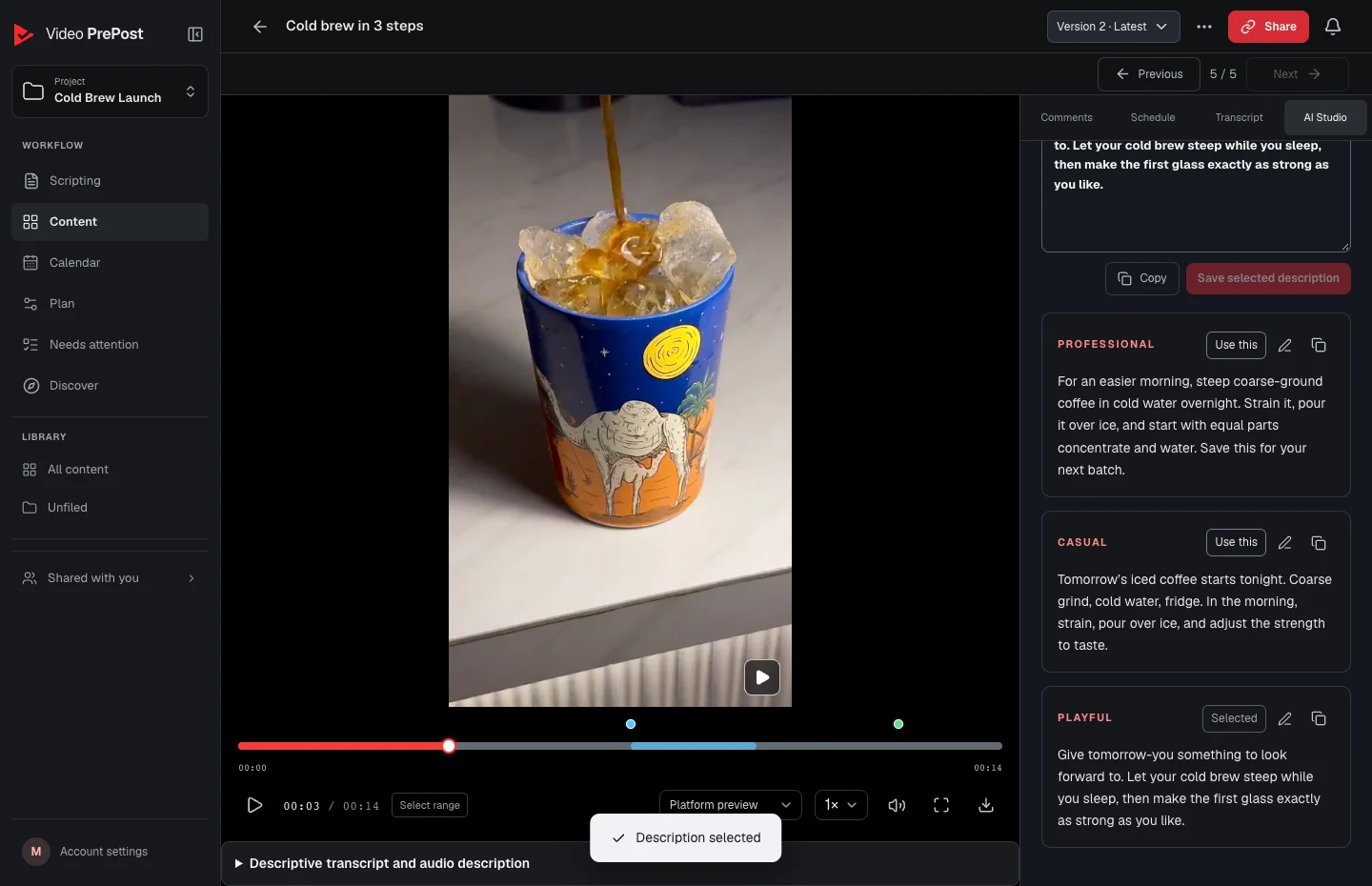
One point in three voices
The fact is the same all three times. Choose the version that sounds right for the account and keep the useful recipe detail.
Professional · Let the coffee steep overnight for an easier morning prep. Casual · Tomorrow’s iced coffee starts tonight. Playful · Give tomorrow-you a cold brew to wake up to.
Match the voice to the account
The Social posts tool offers Professional, Casual, and Playful caption styles. Additional directions help the draft match a specific audience, length, or target phrase.
Tone choices are useful when one person writes for several brands or when a client keeps asking for copy to sound more like them. Comparing the same fact in three voices makes the choice tangible.